


 By neha - July 03, 2026
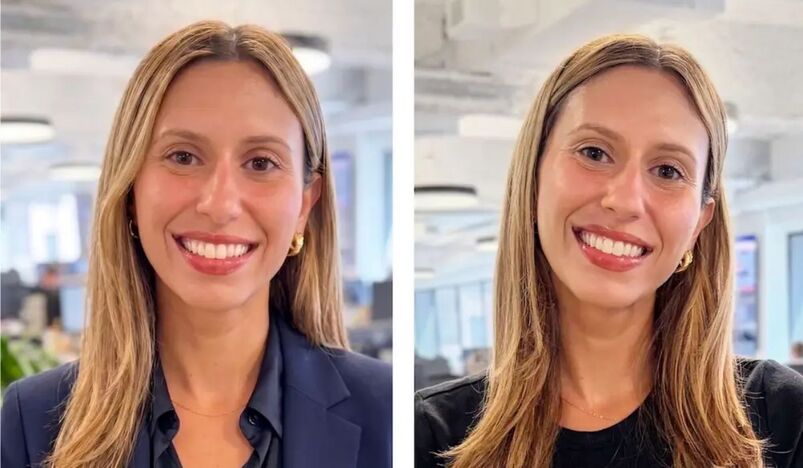
I cringe every time I open LinkedIn and see my profile picture. That's because it's fake.
A few months ago, I snapped some selfies at work for a new headshot. I asked ChatGPT to extend the blue background behind me. I asked it repeatedly not to touch my face. It made subtle changes anyway. My eyes look slightly squintier. My smile looks a little wider. There's a soft, airbrushed quality that makes the image feel less like me.
I'm not alone. AI headshots have quietly taken over LinkedIn, and most people scrolling past them have no idea.
Why everyone suddenly has a perfect headshot
A real photography session still costs between $150 and $400, plus travel time and scheduling headaches. AI headshot generators typically cost around $250 less and take a fraction of the time. You upload a handful of selfies, pick a style, and get dozens of polished portraits within an hour.
That math explains the flood of eerily flawless faces on your feed. Freelancers use AI headshots to skip a costly shoot. Job seekers use them to look consistent across platforms. Companies use them to give entire leadership pages a matching, professional look.
Most of this is harmless. Using an AI headshot for a legitimate professional reason isn't inherently dishonest, since plenty of people just want an affordable alternative to a studio shoot. The trouble starts when the photo stops representing the actual person underneath it.
The old tricks don't work anymore
For years, people spotted AI images by checking the hands or counting teeth. Those tricks are mostly useless now. Newer AI models have largely fixed the hand problem, and earrings now render correctly too.
Skin texture is still one of the more reliable giveaways. The clearest signs remain unnaturally smooth skin, mismatched jewelry details like earrings that don't match, and generic backgrounds with inconsistent lighting. Watch for a faint halo where hair meets the background. That soft blur is a common artifact.
Photographers who shoot headshots for a living notice other patterns. Ear cartilage is one of the easiest tells, since the curved ridges inside a real ear rarely render correctly on AI faces. Many AI tools also default to the same flat, desaturated blue-grey backdrop, a shade almost no real studio actually uses. Clothing is another clue. Real fabric wrinkles and folds naturally, while AI-generated clothing often looks suspiciously flat where a collar meets the neck.
Even when every technical detail checks out, something can still feel off. People who actually know you notice the small asymmetries AI tends to smooth away, like a slightly higher eyebrow or a smile that pulls to one side. That mismatch is why a coworker might pause on your photo without knowing exactly why.
Recruiters are already keeping score
This isn't just a curiosity for designers and photographers anymore. Some recruiting teams now quietly compare notes on AI-generated headshots, treating it as routine screening rather than gossip. Every mismatched photo risks a wasted interview slot, since the candidate who shows up doesn't quite match the profile picture.
The stakes go beyond an awkward first impression. Scammers increasingly build entire fake identities around AI-generated faces and cloned voices, sometimes convincing enough to survive a video call. AI can now produce professional-looking headshots realistic enough that telling them apart from a real photo has become genuinely difficult.
LinkedIn has responded with its own screening tools. The platform says its detection systems catch roughly 99.6 percent of synthetic profile photos, built with help from outside researchers. That leaves a small but real gap where a convincing fake can still slip through.
How to check your own photo
You don't need special software to run a basic check. Zoom in on the ears first and look for anatomical detail. Check where your collar meets your neck for stiff, flat fabric. Look for a faint blur where your hair meets the background. Compare the skin texture to an older, unedited photo of yourself.
If you used an AI tool and it changed more than the background, you're not imagining it. Photo quality depends heavily on your source images. The AI works by translating information from your uploaded photos into a new image, so poor input photos produce poor results. Consistent lighting, a neutral expression, and several recent photos give the model far less room to invent details.
Should you even worry about this
Using an AI headshot isn't automatically a red flag. The real ethical concern isn't the use of AI itself but deceptive use, like building an entirely fake identity for a scam. A software developer who saves a few hundred dollars and a weekend by generating a decent headshot isn't doing anything wrong.
Transparency is the simple fix. If a colleague or recruiter asks whether your photo is AI-generated, say so. The bigger issue is a photo so heavily altered that people meeting you in person do a double take.
I still haven't decided whether to swap my headshot back to a real, unedited photo. But now, at least, I know exactly what to look for when I check someone else's.
_27-51-2026_11-51.png)
_27-43-2026_12-43.png)

_03-27-2026_08-27.jpg)
.jpg)


.jpg)
.jpg)




.jpg)


.jpg)
.png)
.jpg)





Leave a comment